


Steam has just rolled out some fantastic new features that make gifting games, hardware, and gift cards a breeze! Whether you're looking to surprise a friend or simply share your favourite titles, these updates are sure to enhance your experience on the platform.
One of the standout features is the guest checkout option. Previously, this was limited to hardware and gift cards, but now you can purchase games without needing a Steam account. This means if you want to buy a game from a friend's wishlist, you can do so easily. If you're aiming for a surprise, all you need is the recipient's email address. The recipient will receive an email with all the necessary details to log into their account and redeem the gift. Just remember, their account must be in the same country as the purchase, and they need to redeem it within 30 days to avoid automatic refunds.
Another exciting addition is the ability to gift games directly across regions. Steam will handle the calculations for you, so you won't have to figure out how many gift cards you need to cover the price of a game. However, keep in mind that the recipient must be on your friends list for this feature to work.
Additionally, Steam has expanded its wishlist functionality. You no longer need to be friends with someone to gift them a game from their wishlist. Plus, you can create specific, filtered wishlists to share with family and friends, making it easier for them to know exactly what you want. When someone sends you a gift, your details will be auto-filled in the checkout cart, streamlining the process even further.
Guest checkout
In 2024, we added guest checkout, which lets a family member or friend make a gift purchase without needing to create a Steam account. This feature was limited to digital gift cards and hardware purchases at the time.
Now guest checkout can be used to buy any game on Steam.
You can send a wishlist share link to a friend or family member, and they can purchase gifts directly from that list without needing a Steam account themselves. If a guest wants to send a gift as a surprise, they can send it to any email address instead.
Gift to email
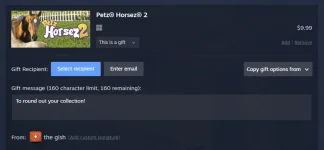
Don't know your nephew's Steam account? No problem, both digital gift cards and games can now be sent directly to email recipients. And don't worry if your nephew's email address is the same one they use for their Steam account. The email will include a link to let them sign in to their account and accept the gift.
Please note that any gift email not accepted within 30 days will be automatically refunded, so they cannot be scheduled for future delivery. The recipient of the gift must also live in the same country as the purchaser.
Cross-region gifting
Buying a gift for a friend in a higher-priced region? In the past, digital gift cards were the gifting solution, but that required you to know the full price of the game in your friend's region.
Now you can gift games directly to your friend. Steam will calculate the cost in your friend's region at checkout. Your friend needs to be on your Steam friends list to send this type of gift.
Direct from wishlist
Sending a friend or family member a link to your wishlist is a great way to help them choose a great gift for your birthday or holiday. We have made several share link improvements, including:
Overall, these new features promise to make gifting on Steam more seamless and enjoyable. It's interesting to see these changes come at a time when discussions about game ownership are becoming more prevalent, but that's a topic for another day!
One of the standout features is the guest checkout option. Previously, this was limited to hardware and gift cards, but now you can purchase games without needing a Steam account. This means if you want to buy a game from a friend's wishlist, you can do so easily. If you're aiming for a surprise, all you need is the recipient's email address. The recipient will receive an email with all the necessary details to log into their account and redeem the gift. Just remember, their account must be in the same country as the purchase, and they need to redeem it within 30 days to avoid automatic refunds.
Another exciting addition is the ability to gift games directly across regions. Steam will handle the calculations for you, so you won't have to figure out how many gift cards you need to cover the price of a game. However, keep in mind that the recipient must be on your friends list for this feature to work.
Additionally, Steam has expanded its wishlist functionality. You no longer need to be friends with someone to gift them a game from their wishlist. Plus, you can create specific, filtered wishlists to share with family and friends, making it easier for them to know exactly what you want. When someone sends you a gift, your details will be auto-filled in the checkout cart, streamlining the process even further.
Guest checkout
In 2024, we added guest checkout, which lets a family member or friend make a gift purchase without needing to create a Steam account. This feature was limited to digital gift cards and hardware purchases at the time.
Now guest checkout can be used to buy any game on Steam.
You can send a wishlist share link to a friend or family member, and they can purchase gifts directly from that list without needing a Steam account themselves. If a guest wants to send a gift as a surprise, they can send it to any email address instead.
Gift to email
Don't know your nephew's Steam account? No problem, both digital gift cards and games can now be sent directly to email recipients. And don't worry if your nephew's email address is the same one they use for their Steam account. The email will include a link to let them sign in to their account and accept the gift.
Please note that any gift email not accepted within 30 days will be automatically refunded, so they cannot be scheduled for future delivery. The recipient of the gift must also live in the same country as the purchaser.
Cross-region gifting
Buying a gift for a friend in a higher-priced region? In the past, digital gift cards were the gifting solution, but that required you to know the full price of the game in your friend's region.
Now you can gift games directly to your friend. Steam will calculate the cost in your friend's region at checkout. Your friend needs to be on your Steam friends list to send this type of gift.
Direct from wishlist
Sending a friend or family member a link to your wishlist is a great way to help them choose a great gift for your birthday or holiday. We have made several share link improvements, including:
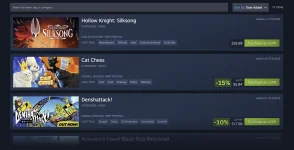
- You can now send a digital gift card or gift a game directly from someone's wishlist
- You no longer need to be friends on Steam to send gifts
- You can create a shared wishlist link that is filtered to specific games
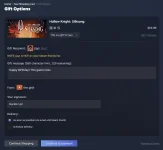
- When a friend or family member clicks on your shared wishlist link, if they choose to gift you a game, the gift recipient in the cart will be pre-populated with your information.
- And remember from above, your friend or family member can checkout as a guest, without needing to create a Steam account
Overall, these new features promise to make gifting on Steam more seamless and enjoyable. It's interesting to see these changes come at a time when discussions about game ownership are becoming more prevalent, but that's a topic for another day!