The latest update is ready to roll out and it includes a number of highly-requested changes. The big headliner is that all Xbox users will now be able to stream from their console directly to Discord. This feature was announced a while back, but it was previously in testing via the Xbox Insiders programme. That testing is now over and the feature will soon become available to all.
Additionally, the update includes a revision of the Variable Refresh Rate settings for Series X/S consoles. The blog post instructs that, as of this week, you'll be able to select whether you want VRR enabled. To do so, go to General, followed by TV & Display Options followed by Video. A dropdown menu will then allow you to alter your VRR settings.
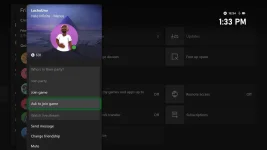
Rewards are now easier to locate too. You can simply press the Xbox button to open up your guide and rewards will be viewable after clicking on the Profile & System page. See a friend online you want to play with? You can now select a 'Ask to join game' option while viewing their profile.
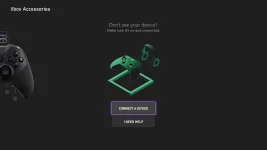
You can now pair a console device without having to stand up and press the console's pair button. Instead, simply open up the Xbox Accessories app and select the new Connect a Device option.
You can read the full update notes below.
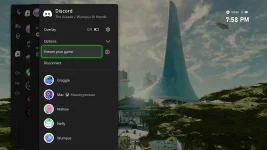
To get started, first link your Discord account. Then you can join voice channels from your Discord servers directly from your Xbox console. To navigate there, press the Xbox button on your controller to open the guide, scroll to Parties & chats, and select Discord. Then scroll through your available Discord servers, jump into a voice channel with friends, and share your gameplay!!
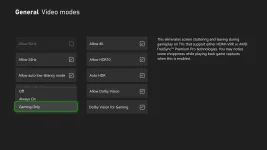
Starting this week, you can choose how you want VRR enabled on your Xbox Series X or Series S console. To select your option, go to General > TV & display options > Video,and then go to the dropdown menu for VRR. You can select if you want VRR to be "Always On," "Gaming Only," or "Off."
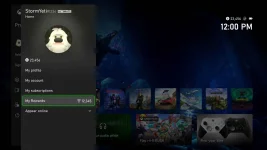
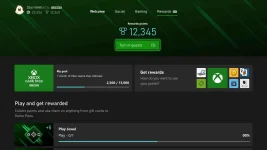
Additionally, you can now find the Redeem Rewards catalog directly from the Rewards tab in your profile. To check it out, open the guide and go to Profile & system > your profile > My Rewards.
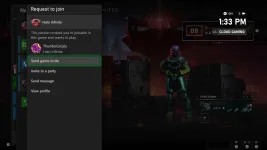
Your friend will receive a notification of your request to join, and they can respond back to you with a game invite, a party invite, or a message.
This feature is purpose-built to support the wide variety of in-game interactions between players and works across thousands of games that offer in-game multiplayer voice chat, including Xbox 360 backward compatible titles. Voice reporting is available starting this week to Xbox console players in select English-language markets (U.S., UK, Canada, Ireland, Australia, and New Zealand).
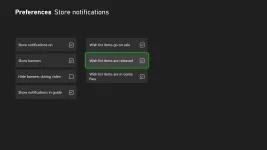
The new wish list notifications will show up in the guide and as a pop-up to let you know when your wish list games are available. In Settings > Preferences > Store notifications, you can decide if you want to see notifications in the guide, when your wish list items are released, when they are available with Game Pass, and more.
Additionally, the update includes a revision of the Variable Refresh Rate settings for Series X/S consoles. The blog post instructs that, as of this week, you'll be able to select whether you want VRR enabled. To do so, go to General, followed by TV & Display Options followed by Video. A dropdown menu will then allow you to alter your VRR settings.
Rewards are now easier to locate too. You can simply press the Xbox button to open up your guide and rewards will be viewable after clicking on the Profile & System page. See a friend online you want to play with? You can now select a 'Ask to join game' option while viewing their profile.
You can now pair a console device without having to stand up and press the console's pair button. Instead, simply open up the Xbox Accessories app and select the new Connect a Device option.
You can read the full update notes below.
Summary
- Stream games from Xbox to Discord.
- Variable refresh rate (VRR) update for Xbox Series X|S consoles.
- New places to view and redeem Rewards and much more.
Stream your games from your Xbox to your Discord friends
We heard that you wanted more Discord features! Starting this week, you can stream gameplay directly from your Xbox to your Discord friends. With a simple click on "Stream your game," your Discord friends can now watch as you play your favorite console games.To get started, first link your Discord account. Then you can join voice channels from your Discord servers directly from your Xbox console. To navigate there, press the Xbox button on your controller to open the guide, scroll to Parties & chats, and select Discord. Then scroll through your available Discord servers, jump into a voice channel with friends, and share your gameplay!!
Variable Refresh Rate (VRR) update for Xbox Series X|S consoles
Variable Refresh Rate (VRR) allows your TV or monitor to dynamically adjust its refresh rate based on the frame rate of the content you're viewing to give you a smooth, artifact-free experience while you game. However, if you're using your Xbox Series X|S for entertainment experiences, you may not always want VRR enabled.Starting this week, you can choose how you want VRR enabled on your Xbox Series X or Series S console. To select your option, go to General > TV & display options > Video,and then go to the dropdown menu for VRR. You can select if you want VRR to be "Always On," "Gaming Only," or "Off."
New places to view and redeem Rewards
Rewards are now easier to find on your Xbox with the new Rewards tab. You can jump to them quickly by pressing the Xbox button to open the guide, choosing Profile & system, selecting your profile, and then choosing My Rewards, where you'll find your Xbox Game Pass Quests.Additionally, you can now find the Redeem Rewards catalog directly from the Rewards tab in your profile. To check it out, open the guide and go to Profile & system > your profile > My Rewards.
Ask to join your friend's gaming session
Want to check if there's room in your friend's gaming session before joining the party? Now you can go over to your friend's profile and select the 'Ask to join game' option.Your friend will receive a notification of your request to join, and they can respond back to you with a game invite, a party invite, or a message.
Xbox voice reporting – support a safer community for all Xbox players
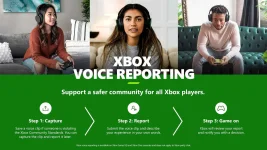
In July we announced platform-wide voice reporting to give players the option to capture and report inappropriate in-game voice chats. Voice reporting equips Xbox Series X|S and Xbox One players with the ability to capture a 60-second video clip of an in-game voice incident that they believe violates Xbox Community Standards and submit it as evidence to the Xbox Safety Team for review.This feature is purpose-built to support the wide variety of in-game interactions between players and works across thousands of games that offer in-game multiplayer voice chat, including Xbox 360 backward compatible titles. Voice reporting is available starting this week to Xbox console players in select English-language markets (U.S., UK, Canada, Ireland, Australia, and New Zealand).
New wish list notifications – Microsoft Store on Xbox
Getting updates on your wish list is getting easier. Want to be the first to get the game when it's available? Now you can get a notification when your wish list games go from pre-order to release, and when your wish list games enter Game Pass.The new wish list notifications will show up in the guide and as a pop-up to let you know when your wish list games are available. In Settings > Preferences > Store notifications, you can decide if you want to see notifications in the guide, when your wish list items are released, when they are available with Game Pass, and more.
Easily pair new accessories to your Xbox console
You can now easily pair new accessories to your Xbox console without having to move from your couch to push your Xbox console's Pair button. To get started, open the Xbox Accessories app, and use the new "Connect a Device" option.